Your shows, your hours, your invoices.
Card is the crew’s app: your call time at the top, the hotel and venue one tap away, and the money side done for you, from clocking in to the invoice in the client’s inbox.
Or open Card with a sign-in codeEverything Card does, one feature at a time
Tap Next feature to walk through it. It’s the same tour you get in the app.
Open it and you know where to be
On a show day, the first thing you see is your call.
Your day
- Your call, the door to report to, meals and the wrap time
- After your call, Today moves on: your next meal, the one after, then end of day (set per show)
- A big Today’s hours button to clock in, and the TD’s latest update
- Tomorrow’s call, meal and door, every evening
- Your room number (read off a photo of the key sleeve), and the rewards number for tonight’s hotel
- Big Copy buttons for the venue address (with Uber, Lyft and maps), the hotel and its confirmation number, and the TD’s phone
- Your flights: airline, times, the confirmation number to copy, and updated times when it runs late
- Show links: the stage plot, a shared folder, or a photo or PDF, a tap away
What needs you
A pencil that ran out or dates the TD changed sit in red at the top, then messages, notes from the TD and offers waiting on you.
Show contacts
Call, text or email the people on today’s show in one tap. Keep your own numbers on each show, load a venue’s people from your Phonebook onto any show, and send them straight to the Card of someone working it with you, or share a link.
Nothing on?
“No show today”, with a tap to your next one.
Every show you’re on, in one place
Join with a link and PIN
Paste the Show App link and PIN your TD sent, and the show lands in your Card, kept up to date as the TD edits.
- The TD’s updates, including ones just to you, with Reply
- Crew info: badge pickup, radio channel, report-to door, meal rule
- Call times for every day, the crew memo, schedule and files
- The crew list, when the TD shares it
- Ask to change your dates
Your shows list
- A list or a month calendar, colored Locked in, Penciled in or Offered
- “On now”, “Tomorrow”, “In 4 days”, “Wrapped · not invoiced yet”
- Counts for new updates and open Punch items
- Archive a show, or leave it
- Each show keeps its own time zone
Shows that aren’t on LoadIN
Add any show yourself: name, dates, venue and address, hotel and confirmation number, the production company, your position, and the crew memo or schedule as a PDF, a photo, an Excel file or pasted text, or a live link to the one production keeps in Google Sheets, Dropbox, Box or OneDrive (Card checks it for changes when you look). Start from the crew memo or schedule and Card fills in the show for you: its name, dates, venue, hotel and who you bill, then your call (your department’s), lunch, the other meals, the end of each day and the contacts on the memo, all onto your Today screen. Pinch or double-tap any page to zoom into the small print. Hours and invoices work the same.
The Show App, no account needed
The TD’s link opens the show in any browser: schedule, letter, crew, hotel and travel, what changed since you last looked, and an offline copy of the last version your phone saw. A show with a run of show lists each segment with its item number, start time and length, a color by kind, and the day’s version. Save it to your Card in one tap.
Working a show with a friend? Share it: everything you put in it, except your money, lands in their Card in one tap.
A show’s page as blocks
Your call and Getting there on top, then six gold groups below, so you find things without hunting.
Show feedback
When the show wraps, rate it, answer the TD’s questions and leave a comment, with or without your name.
Askon each show’s page, and in the Show App
Type a question the way you’d text it (“what time we in tmrw”) and the answer comes back right under it, from the show itself. Nothing to download.
- Your call, meals and walk-aways, end of day or your cut, what’s now and what’s next
- Where to report, the venue, your hotel and its phone, doors and show times, rehearsals, strike and load out
- People: your department head, who runs a department, positions, and phone numbers when the TD shares crew contacts
- Labor counts when the TD shows them, and crew info like badges and the radio channel
- The venue Wi-Fi straight from the TD’s Forge, with copy buttons: networks for everyone in the Show App, production-crew networks only for production crew signed in to Card
- “Am I working Saturday?”, “When do I get paid?”, and “Is call still 6:30?” answered yes or no first
- How to do something in Card, with Take me there. An answer about a day opens that day on the schedule
- Couldn’t answer? Tap Tell LoadIN what you asked: Report a problem opens with your questions, and nothing goes until you tap Send
Say yes, maybe, or no thanks
When a TD offers you a show, it shows the position, dates, city, who it’s from and their note.
Lock in
The show goes straight into your Card.
Pencil in
Hold it for 3, 7 or 14 days, or until a date up to 60 days out, with a note. You’re reminded the day before it runs out.
Decline
With a reason if you like, or send the TD a question first.
What your TD needs, in one place
When a TD asks you for something in LoadIN Forge, it lands on Today with an alert, and in More → Messages → Requests. Messages from your TDs and your Resources conversations are in the same place.
Requests
- Your COI or W-9, an estimate, your department’s venue asks, or a food order
- Send it right there, or open the TD’s page with its access code copied
- Each one turns Done by itself when the TD has it
Your COI or W-9 in one tap
Keep them in You → Documents. When a TD asks, tap Send my COI or Send my W-9 on the request and your newest one goes. If your COI has ended, Card says so first.
Food orders
Ordering a meal for the crew? Tap Received, Ordered and Delivered so the TD knows where it stands. Open shows what to get, for how many, and where the receipt goes.
For your TDs
Your food needs, allergies and emergency contact go to the TDs of shows you’re on, never other crew. Your emergency contact is only for the people who work on the TD’s crew. Turn sharing off any time.
Papers to sign
Deal memos, NDAs and show rules from your TD wait under You → Papers to sign. Read them and sign in Card; the TD countersigns. You can also send your rate to a TD from Card.
Once you sign a deal memo, its day rate, overtime, per diem and days to pay go onto that show. The show’s Money page shows what you signed, a new invoice says Not what you signed if it doesn’t match, and estimates start from it. In Ledger, a new invoice or estimate can start from a signed deal memo too.
Requests come to Card when you sign in with Google using the email your TD has for you. Otherwise they come by email.
Clock in. The math is done.
Your day rate, overtime, double time and meals, figured the way you’re paid.
Your hours
- Start the clock, or type your hours on a grid of the show’s days
- On the clock: the running time, Clock out, and a meal break you start and end (or pick 30, 45 or 60 minutes)
- Your day rate covers your straight hours, then time and a half, then double time; switch any off
- Meals under an hour stay paid, or set all meals paid; a show can have its own rules
- List your hours newest first or first day on top; clocked out too soon? Undo
- Book a show with your day rate and its days fill in as 10-hour days; change any day, or type a day’s total hours
- See what’s ready to invoice on every show, and what’s coming up: your day rate for the days you’re booked
A 14-hour day$950 for 10 hours · OT to 12 · then DT
The rest of the money side
- Expenses in one place: snap a receipt (the total, store and date are read for you), log your miles, or type one in with no receipt. On a show, bill it back or keep it as yours; no show, it’s a business expense
- My rates: your day rate, per diem and mileage in one place, and per diem every day or day by day, with the government rate for the city as a guide
- Estimates as a PDF, with a deposit to book; once it’s in, the show’s invoice takes it off as paid
- Repeating business expenses (a phone bill, insurance) added on their day
- Overview: what needs you first (late invoices, shows ready to invoice), then your year in four numbers: received, owed to you, expenses, kept
- Year-end package for your accountant: income by client, every payment and invoice, every expense with its receipt, as one PDF or a spreadsheet
From hours to the client’s inbox
Your invoice
- Each show has its own Money page: what’s ready to invoice, what you’ve worked, invoiced and been paid, and what’s owed
- Built from the days you haven’t invoiced yet, plus per diem, receipts you bill back, miles and your own charges; untick anything to leave it for a later invoice
- Your clients saved as you go, or added right from the invoice: pick one and their email, CC, address, terms and your rate with them fill in
- Bill-to filled in from the TD’s billing details in Forge, or your own
- Every detail in a box, filled in for you: the job name, show dates, venue, their PO #, a note, your own details. Change any of them, even after it’s made
- Net terms set the due date; receipt photos go at the back of the PDF
- Two looks, Classic or LoadIN, in your color
Emailed for you
Send it from invoices@loadinshow.com with your W-9, insurance or ACH form and the show’s files attached. Replies come to you, and you can get a copy.
Know who owes you
Draft, Sent, Partly paid, Late and Paid, with search and folders by month. Record each payment as it lands, all of it or part, with the day it came in, and every invoice keeps its history. One that’s cancelled can be voided: it stays on record as VOID.
Late reminders
A lock-screen nudge to you the day after it’s due, then weekly. Nothing is sent to the client without you.
Your clients
One list of the people you bill, grouped by the business that bills them: their email, phone and address, your day rate and days to pay with them, their invoices and what they still owe. The same list is in Ledger, kept matching both ways.
The right nudge, at the right time
Switch each kind on or off. On an iPhone, add Card to your Home Screen first.
Your card, your paperwork, your people
Share my Card
Your own page with the jobs you work and a QR code. People save you to their contacts in one tap.
My documents
Your W-9 (it fills in the official IRS form), insurance with its expiry date, and your ACH form, ready to attach.
Phonebook
Your private contacts, searchable right from Today with call and text. Venue staff are grouped by venue. Link a venue’s group to that venue in Resources, save it as contact cards or a spreadsheet, and share one or the group with someone you’re working with.
Resources
Towns and venues with site surveys, photos and reviews, vendors, and crew people recommend. Free on every Card. You’re listed under Production (name, jobs and city, never your phone or email) unless you keep yourself private: TDs on LoadIN Forge can message you, other crew ask to connect first, and you can block anyone.
Ledger: the books behind your Card
Ledger is where your money adds up: your business and your household together, with a running estimate of your federal tax. It opens with your Card account, and what you do in Card lands there on its own.
One page for where everything stands: money in and out by month, who still owes you, cash on hand, debts, and what needs you.
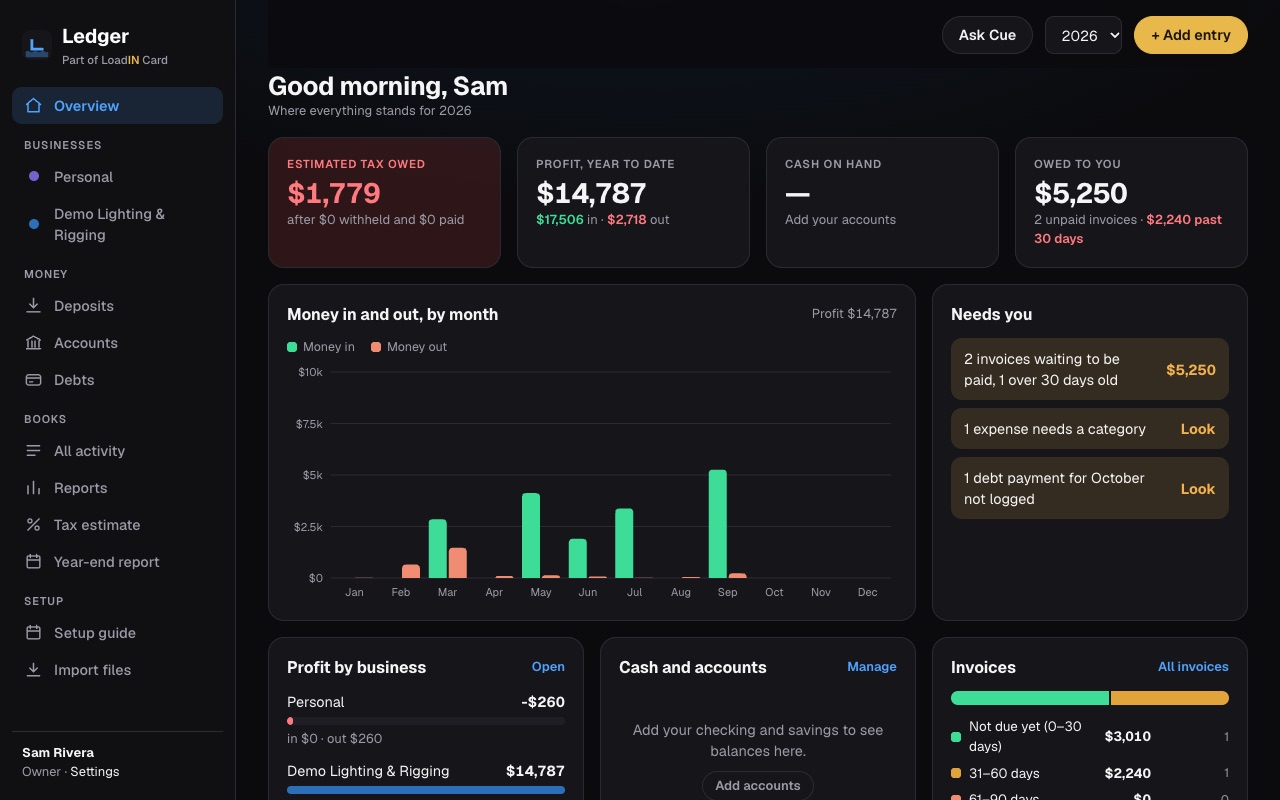
Card fills it inReceipts, invoices, payments
Once you connect your Card in Ledger, the receipts you scan and the invoices you send in Card show up in Ledger every hour, and invoices you make in Ledger are created in Card.
A tax estimate that fits youPlanning, not tax advice
Sole proprietor, single-member LLC or S-corp: each business is counted the way it’s taxed, with mileage, meals at 50% and self-employment tax. Hand the year-end report to your tax preparer.
Every business, plus homeAs many as you run
Each business gets its own page, invoices and estimates, with its own letterhead. Household spending and debts sit beside them.
Private booksYours alone
Nobody else sees your Ledger, not your TD and not other crew. Invite a spouse, partner or bookkeeper and choose which businesses they see. The first one rides free on your full Card and doesn’t need a Card account: they sign in to Ledger with Google.
Clients and vendorsPer business
Your clients, the same list as in Card, each with their invoices and what they owe: pick one on an invoice and it fills in. Vendors are made from what you spend, with each one’s spending by year and category; their usual category fills in when you add an expense. Combine doubles, hide ones you don’t use.
Bring in what you haveImports
Square reports and ADP payroll files come in without doubling anything, so your year starts with the right totals.
Open to everyone with a LoadIN Card. Sign in with the Google account you use for Card. Download your books or delete them any time, in Ledger’s Settings.
Everything free through April 2, 2027
Free Card Always free
- Up to 2 active shows (archived ones don’t count)
- Show info, the TD’s updates and alerts
- Offers, and your open Punch items
- Messages, Share my Card, rewards numbers and your documents
- Resources: venues, vendors, crew, and messages from TDs and crew
Full Card Free through Apr 2, 2027 · then $8/mo or $80/yr
- Clock in and out, with OT and meals figured (forgot to clock in? start the clock from your call time)
- Invoices as a PDF, emailed to the client, with late reminders
- Receipts scanned and attached, mileage, estimates and your money overview
- Files kept with each show, your phonebook, and as many shows as you work
- Ledger: your books and a running tax estimate
The full Card is free through April 2, 2027 (or for your first two months, if you join after Feb 2). To keep it after that: $8 a month, or $80 for the first year. These are introductory prices: they’ll be looked at again in May 2027 and could go up, and a year you pay for keeps its price for that whole year. Nothing is charged unless you say yes; choosing during your free months keeps them (the first payment is when they end), and you can cancel any time. Or stay on the free Card, yours to keep. A LoadIN Forge subscription includes the full Card.
Your TD’s show, straight to your phone
When the TD runs the show in Forge, it comes to you in Card. Card works on its own too: add any show yourself.
The schedule and your call times, the TD’s updates and messages, show offers, requests for your COI, W-9 or a food order, and the billing details that fill in your invoices.
Your shows, your hours, your invoices, in your pocket.
How many items are open on you, and what’s blocked, right on each show.
Good to know
What does it cost?
The full Card is free through April 2, 2027 (or for your first two months, if you join after Feb 2). After that, keeping it is $8 a month or $80 for the first year (introductory prices, looked at again in May 2027 and could go up; a year you pay for keeps its price for the year), and nothing is charged unless you say yes (choose early and you still keep your free months). Or stay on the free Card: up to 2 shows with their info, the TD’s updates and alerts, and Resources. Your hours, invoices and receipts stay saved either way.
What is Ledger?
The books behind your Card: your business and household money in one place, with a running federal tax estimate and a year-end report for your tax preparer. It opens with your Card account at ledger.loadinshow.com (the one person you invite, say your spouse, signs in there with Google and needs no Card), and receipts, invoices and payments from Card land there on their own once you connect your Card in Ledger. It comes with the full Card: free as long as your full Card is free (through April 2, 2027, or your first two months if you join after Feb 2), then part of keeping the full Card, $8 a month or $80 for the first year (introductory prices).
Who can see my Ledger books?
Only you, and anyone you invite (a spouse, partner or bookkeeper), who sees only the businesses you pick. Your TD and other crew never see them. You can download everything as spreadsheets, or delete your books, any time in Ledger’s Settings. More in the privacy policy.
Do I need an account to see my show?
No. The TD’s Show App link opens in any browser. Sign in when you want the show saved in your Card with everything else.
My TD doesn’t use LoadIN. Can I still use it?
Yes. Add any show yourself, with its dates, hotel and crew memo. Hours and invoices work the same way.
How does it figure overtime?
Your day rate covers your straight hours, then time and a half, then double time, each of which you can switch off. Meals under an hour stay paid, and a show can have its own rules.
Who sees my food needs and emergency contact?
Only the TDs of shows you’re on, never other crew or the Show App. Your emergency contact is only for the people who work on the TD’s crew. Turn sharing off any time in You → For your TDs.
Why didn’t my TD’s request show up in Card?
Card matches requests by your Google sign-in. Sign in with Google (or connect it in You and settings → Sign-in) using the email your TD has for you. Until then, they come by email.
Does Ask send my questions anywhere?
Only the ones it can’t answer, so we can teach it: the question and which show, never who asked. Ask reads the show right on your phone, with nothing to download. You can also tap Tell LoadIN what you asked to send us more about it.
Does the TD see my hours or invoices?
No. Your hours, invoices and receipts are yours. Card doesn’t send them to the TD.
Will it chase late payments?
It reminds you, on your lock screen, the day after an invoice is due and then weekly. It never contacts the client on its own.
Is it an app from the store?
No store needed. Open card.loadinshow.com and add it to your home screen; it opens full screen like any app.
Put your work life in your pocket
Free through April 2, 2027. Add your first show in a minute.
Running the show? LoadIN Forge is the TD’s HQ. On the punch list? LoadIN Punch is free.